
Best Practices to Convert Image to PXF File in 2025
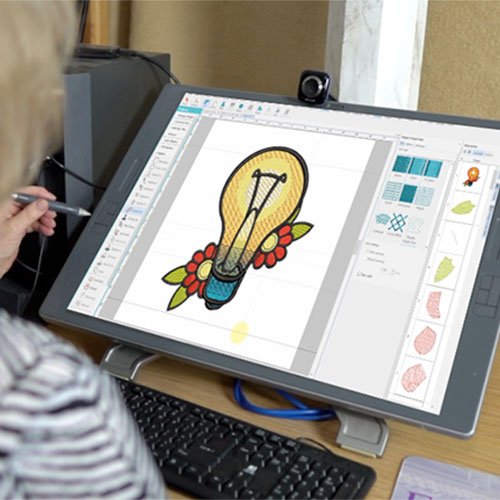
As we move into 2025, the tools and techniques for creating embroidery files are smarter and more accessible than ever. Yet, the core challenge remains: your Husqvarna Viking or Pfaff embroidery machine, guided by Pulse software, requires a precise set of instructions in the form of a .PXF file. While AI promises automation, achieving truly professional, stitch-perfect results still hinges on human-guided processes and smart workflows. Whether you're a small business owner or a dedicated hobbyist, mastering the best practices to Convert Image to PXF File is essential for efficiency and quality. This guide outlines the modern, effective approach—from AI-assisted preparation to expert digitizing principles—that will define successful embroidery file creation in the coming year.
The 2025 Mindset: Augmented Workflows, Not Full Automation
The biggest shift in 2025 is the move from purely manual digitizing or basic auto-conversion to augmented workflows. The best practice is no longer "do everything manually" or "let the AI handle it." It's about using intelligent tools to handle the tedious first draft, then applying human expertise to engineer the file for physical success. Your role evolves from a manual plotter to a creative director and quality controller.
Best Practice #1: Start with Smarter Art Preparation
The old way: struggling to clean up a low-res JPG in basic software.
The 2025 way: Leveraging AI-powered design tools at the very beginning.
Use AI to Enhance and Vectorize: Before you even open digitizing software, use accessible AI design platforms. Tools like Adobe Illustrator's AI features or free online vectorizers can now intelligently upscale low-resolution logos, remove complex backgrounds with a single click, and create cleaner vector paths from raster images. This gives you a superior starting point, reducing hours of manual tracing.
Demand and Create Native Vector Files: The golden rule remains unchanged but is easier to enforce. For any business logo, insist on the original vector source (.AI, .EPS). In 2025, more designers and clients understand this need. If you only have an image, using an AI vectorizer is now a legitimate first step in the preparation phase.
Best Practice #2: Choose Your Software Ecosystem Wisely
The software landscape is consolidating around integrated platforms. The best practice is to choose a toolset that fits your commitment level and offers a clear path to PXF export.
For the Professional or Dedicated Business: Wilcom Hatch remains the industry-leader for augmented digitizing. Its AI-powered auto-digitizing and image-tracing in 2025 are more of a collaborative starting point. You then use its full suite of professional tools to apply underlay, pull compensation, and optimize stitch paths before exporting to PXF.
For the Pulse/Viking Native User: Pulse MicroStudio or Pfaff Creative Designer software is your direct route. The best practice here is to fully learn your native ecosystem's digitizing module. These programs are built to output perfect .PXF files and integrate seamlessly with your machine.
The Free & Powerful Route: Ink/Stitch for Inkscape continues to be the most powerful free option. The 2025 best practice is to use it in tandem with the AI prep tools mentioned above. Let AI clean your image, then use Ink/Stitch for the manual digitizing control.
Best Practice #3: The Modern Digitizing Workflow: AI Draft, Human Refine
This is the core operational best practice for 2025.
Intelligent Import & AI-Assisted Trace: Import your prepped image into your chosen software. Use the built-in auto-trace or "image-to-stitch" function to generate a first draft. In 2025, view this as a suggested draft, not a final product. It will map out colors and basic shapes.
Mandatory Human Cleanup & Object Management: This is where your expertise is irreplaceable.
Clean up the AI-generated paths, deleting stray points and simplifying complex curves.
Manually create separate objects for each distinct design element to maintain control.
Apply Foundational Engineering (The Human Touch):
Underlay is Non-Negotiable: AI does not understand fabric stability. For every fill and satin column, manually apply the appropriate underlay (zigzag, grid, center run). This prevents puckering.
Set Intelligent Density: Use software presets for your fabric type (e.g., "Jersey Knit" or "Canvas"), but be prepared to adjust. The 2025 best practice is to err on the side of lower density for better fabric hand and to reduce thread consumption.
Apply Dynamic Pull Compensation: Don't just use a default value. For large fills, apply more compensation. For small satin columns, use less. Modern software allows for object-specific compensation, a tool you should actively use.
Optimize for Production Efficiency: Use the software's stitch simulator to check the pathing. Manually adjust the stitch sequence to minimize trims and jumps, creating a file that runs smoothly and quickly on your machine.
Best Practice #4: Quality Assurance in the Digital Age
The test sew remains vital, but digital previews are more powerful.
Leverage Hyper-Realistic 3D Simulation: Before you stitch a single thread, use your software's 3D simulator. In 2025, these simulators show fabric drape, thread sheen, and potential registration issues with remarkable accuracy. This allows you to catch and correct problems in the digital realm, saving physical materials.
The Physical Test Sew is Still King: However, the best practice is now a targeted test. Based on your simulation, you might only need to test a problematic section of a large design or test on the specific fabric that caused a simulation warning. This makes validation faster and less wasteful.
Best Practice #5: File Management & Future-Proofing
In 2025, organization is part of the professional workflow.
Save in Multiple Formats, Every Time: When you export your final design, the best practice is to save a bundle: the .PXF project file (for future editing in Pulse), a .DST universal stitch file, and a high-resolution PNG proof. Cloud-sync this bundle for easy access.
Build a Searchable Digital Library: Use digital asset management (DAM) practices. Tag your files with keywords like client name, stitch count, and fabric type. This saves immense time when reordering or modifying designs later.
What to Avoid in 2025: Outdated Pitfalls
Fully Automated Online "Converters": These remain a path to poor quality. They lack the ability to apply underlay or understand fabric-specific settings.
Skipping the Simulation Review: With the power of modern 3D previews, sewing a file "blind" is an unacceptable risk.
Ignoring Fabric-Specific Presets: Using a one-size-fits-all density for every material will lead to consistent failures on stretchy or specialty fabrics.
Conclusion: Embracing a Smarter, More Intentional Workflow
The best practices to Convert Image to PXF File in 2025 are defined by intentionality and smart tool use. It's a hybrid model where AI handles initial heavy lifting—cleaning images and suggesting layouts—and human expertise takes over to engineer the file for real-world physics, durability, and efficiency.
By adopting this augmented workflow, you elevate your craft. You spend less time on tedious tracing and more time on creative direction and quality engineering. This approach ensures that the .PXF files you create are not just compatible with your Pulse or Viking system, but are optimized for stunning, reliable, and professional embroidery results. Embrace the tools of 2025, but let your expertise guide them to create stitch-perfect designs that truly stand out.






0 Comments